Disqus Affiliate Links URL Hijacking
Introduction
A few days ago, when I clicked the Instagram icon in my profile widget on my personal website, I was redirected to an unexpected URL: https://cykitchen.pxf.io/c/27795/3277510/42052?subId1=mjmbki868a020o3k12e0i&u=https%3A%2F%2Fwww.instagram.com%2Fdukeleimao and the loaded page displayed the message “The link you clicked on is malformed. Contact the editor of the originating page.”
In this blog post, I would like to share my experience of investigating this issue and how I resolved it.
Investigation
Testing Different Browsers
I first tested the link in different browsers, including Chrome, Firefox, and Brave, on both desktop and mobile phone. In all cases, I encountered the same redirection issue. This indicated that the problem was not specific to a particular browser, but rather a problem on my website.
Searching for Keywords
Next, I searched for the keywords “pxf.io” and “cykitchen” in the source code of my website. But I couldn’t find any references to these keywords in my website’s code. This suggested that those URLs were being injected dynamically at runtime, possibly by a third-party service.
Disabling Third-Party Services
I have installed a few third-party services on my website, including Disqus for comments, Google Analytics for traffic analysis, Buy Me A Coffee and PayPal for donations, and AddToAny for social sharing. To identify the culprit, I temporarily disabled each of these services one by one and tested the Instagram link after each change. It turns out that after disabling Disqus, the Instagram link worked correctly and directed me to the intended Instagram page.
Resolution
Affiliate Links
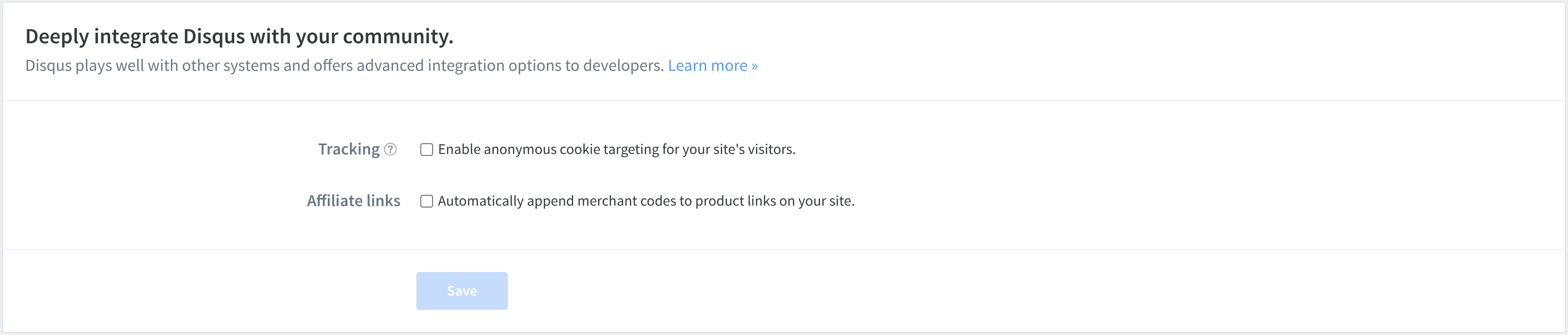
It turns out that Disqus will “hijack” outbound links on websites that use Disqus for comments and convert them into affiliate links to generate revenue for Disqus. This is controlled by the “Affiliate Links” setting in the Disqus admin panel. By default, this setting is enabled, which means that Disqus will automatically convert outbound links into affiliate links. After I disabled this setting, the Instagram link on my website worked correctly and directed me to the intended Instagram page.
Conclusions
This is a perfect example of how insecure a website can be. Even if the website owner is not being malicious, third-party services can still introduce security vulnerabilities.
Disqus Affiliate Links URL Hijacking
https://leimao.github.io/blog/Disqus-Affiliate-Links-URL-Hijacking/