PyTorch modules can consist of nested modules. Unlike ONNX models, understanding a PyTorch module can be challenging because we will have to look into the source code of the module to understand its structure and operations. Torch FX graph is the intermediate representation (IR) of PyTorch modules. It can be inspected and visualized to help us understand the structure and operations of PyTorch modules.
In this blog post, I would like to quickly demonstrate how to inspect and visualize Torch FX graphs using Torch FX FxGraphDrawer on a simple multi-layer perceptron (MLP) module. I will also show how to use TorchFunctionMode and TorchDispatchMode to log the function calls and dispatches during the execution of the module.
Torch FX Graph Inspection and Visualization
The following program creates a simple MLP module with two linear layers and a ReLU activation function. It then performs Torch FX symbolic tracing, Torch Export to ATen IR, and Torch Export to Core ATen IR on the MLP module. The resulting graphs are printed and visualized using FxGraphDrawer. Finally, it uses TorchFunctionMode and TorchDispatchMode to log the function calls and dispatches during the execution of the module.
# Torch FX Symbolic Tracing torch_symbolic_traced = torch.fx.symbolic_trace(module) torch_symbolic_traced_graph_drawer = FxGraphDrawer( torch_symbolic_traced, "mlp_symbolic_traced_graph_drawer") print("Torch FX Symbolic Traced Graph:") print(torch_symbolic_traced.graph)
# Get the graph object and write to a file withopen("mlp_symbolic_traced_graph.svg", "wb") as f: f.write( torch_symbolic_traced_graph_drawer.get_dot_graph().create_svg())
print("TorchFunctionMode logging:") with torch.inference_mode(), FunctionLog(): # result = module(*args) # result = torch_symbolic_traced(*args) # result = exported_program.module()(*args) result = core_aten_exported_program.module()(*args)
print("TorchDispatchMode logging:") with torch.inference_mode(), DispatchLog(): # result = module(*args) # result = torch_symbolic_traced(*args) # result = exported_program.module()(*args) result = core_aten_exported_program.module()(*args)
We could use NVIDIA PyTorch Docker container to run the PyTorch program.
1
$ docker run -it --rm --gpus all -v $(pwd):/mnt -w /mnt nvcr.io/nvidia/pytorch:25.11-py3
# To see more debug info, please use `graph_module.print_readable()` TorchFunctionMode logging: Function Log: torch.Tensor.grad_fn.__get__ Function Log: torch.Tensor.grad_fn.__get__ Function Log: torch.Tensor.grad_fn.__get__ Function Log: torch.Tensor.grad_fn.__get__ Function Log: torch.Tensor.grad_fn.__get__ Function Log: torch.Tensor.grad_fn.__get__ Function Log: torch.Tensor.grad_fn.__get__ Function Log: torch.Tensor.grad_fn.__get__ Function Log: torch.Tensor.shape.__get__ Function Log: torch.Tensor.size Function Log: None Function Log: torch.Tensor.size Function Log: None Function Log: aten.permute.default Function Log: aten.addmm.default Function Log: aten.relu.default Function Log: aten.permute.default Function Log: aten.addmm.default TorchDispatchMode logging: Dispatch Log: aten.permute.default Dispatch Log: aten.addmm.default Dispatch Log: aten.relu.default Dispatch Log: aten.permute.default Dispatch Log: aten.addmm.default
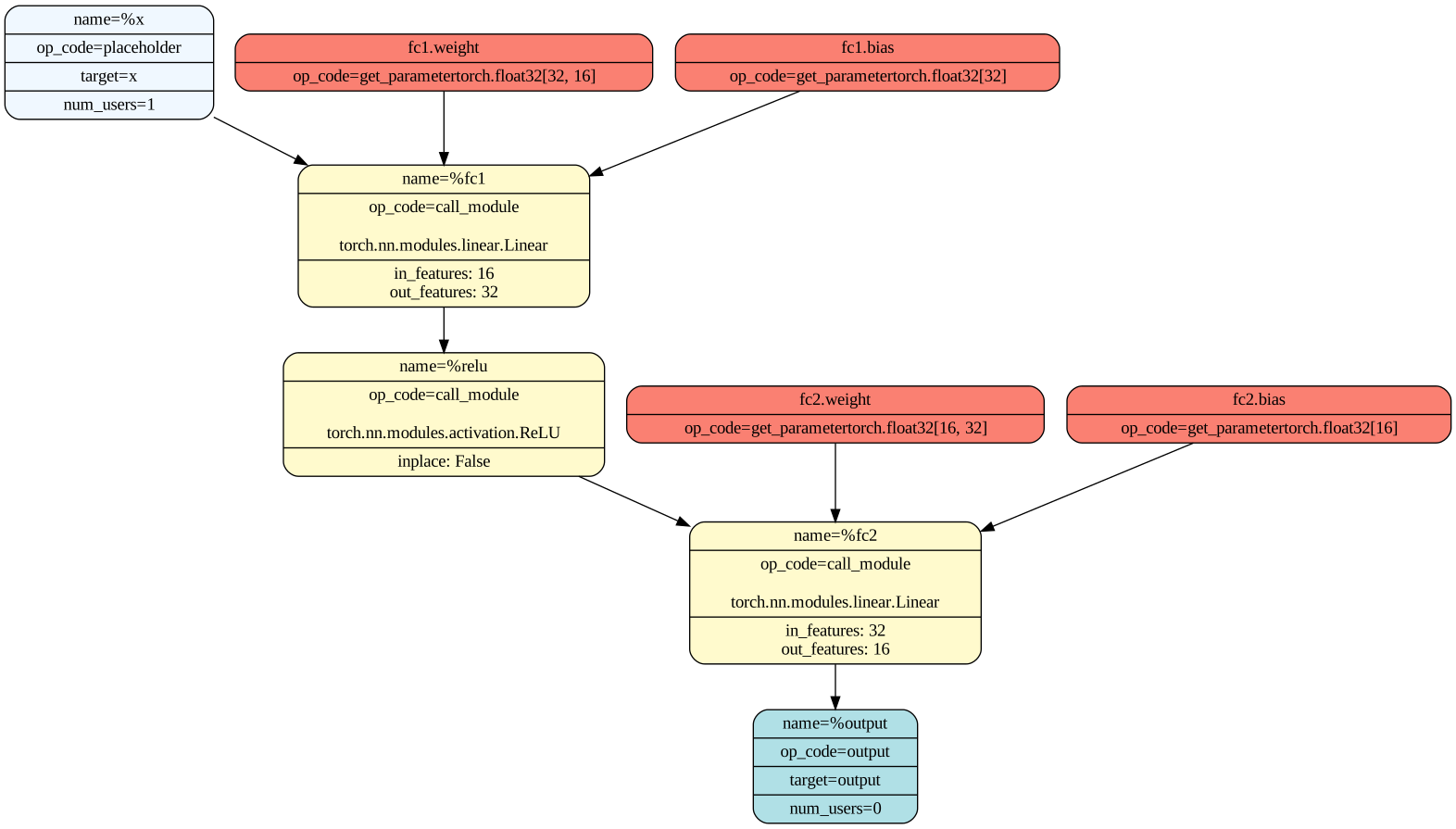
The symbolic traced graph uses Torch high-level torch.nn.module to describe the module structure and operations. Because input tensors are specified during the symbolic tracing, it is unknown what the shapes of the tensors, especially the intermediate tensors, are.
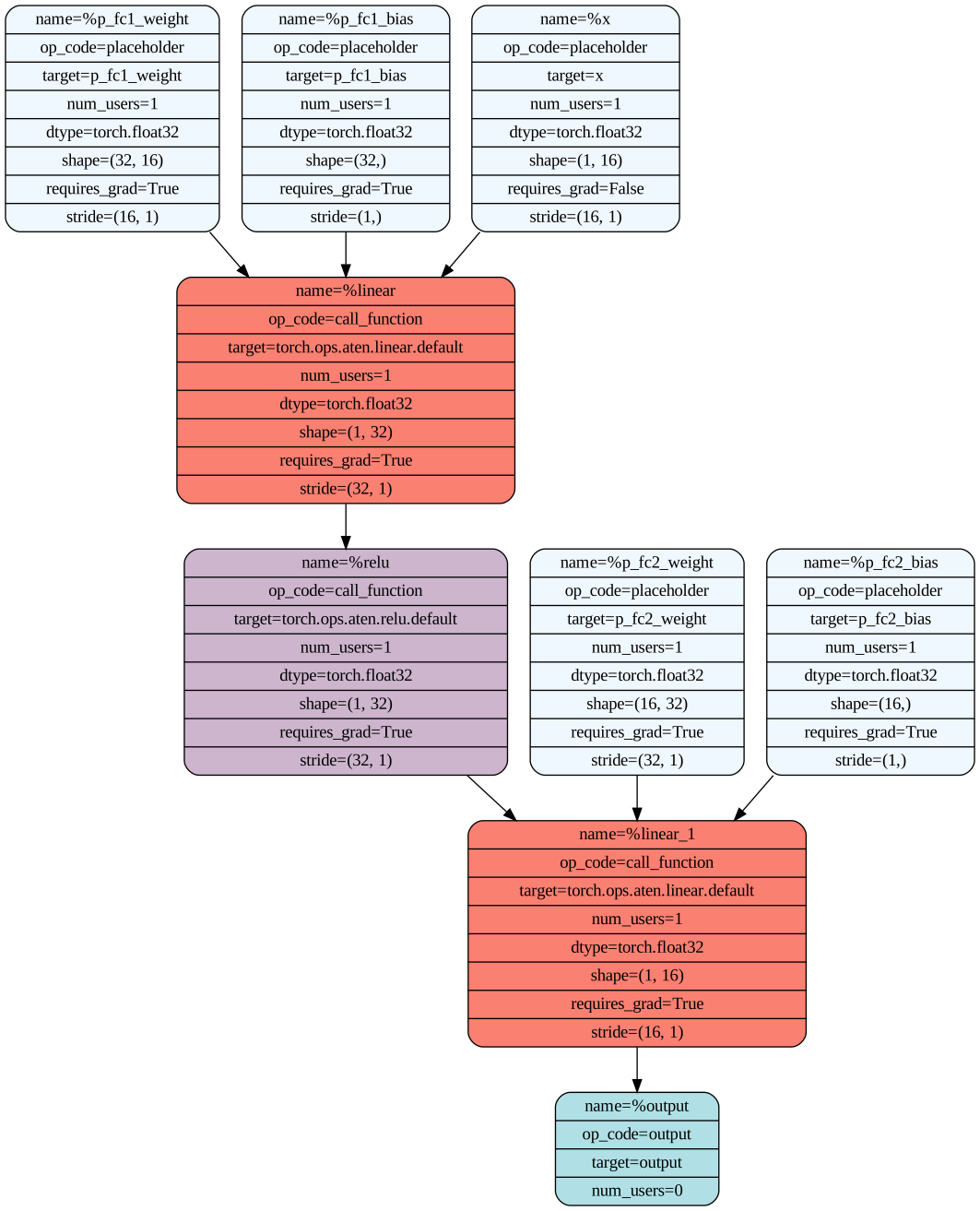
The torch.export is a PyTorch 2.x API used for ahead-of-time (AOT) whole-graph capture of a model into an ExportedProgram object. It requires example inputs to run the model and captures the operations used during the execution of the model. The exported ATen graph uses ATen operators to describe the module structure and operations. The shapes of the tensors are known because example inputs are provided during the export. In this case, aten.linear operator is used to represent the nn.Linear module, and aten.relu operator is used to represent the nn.ReLU module.
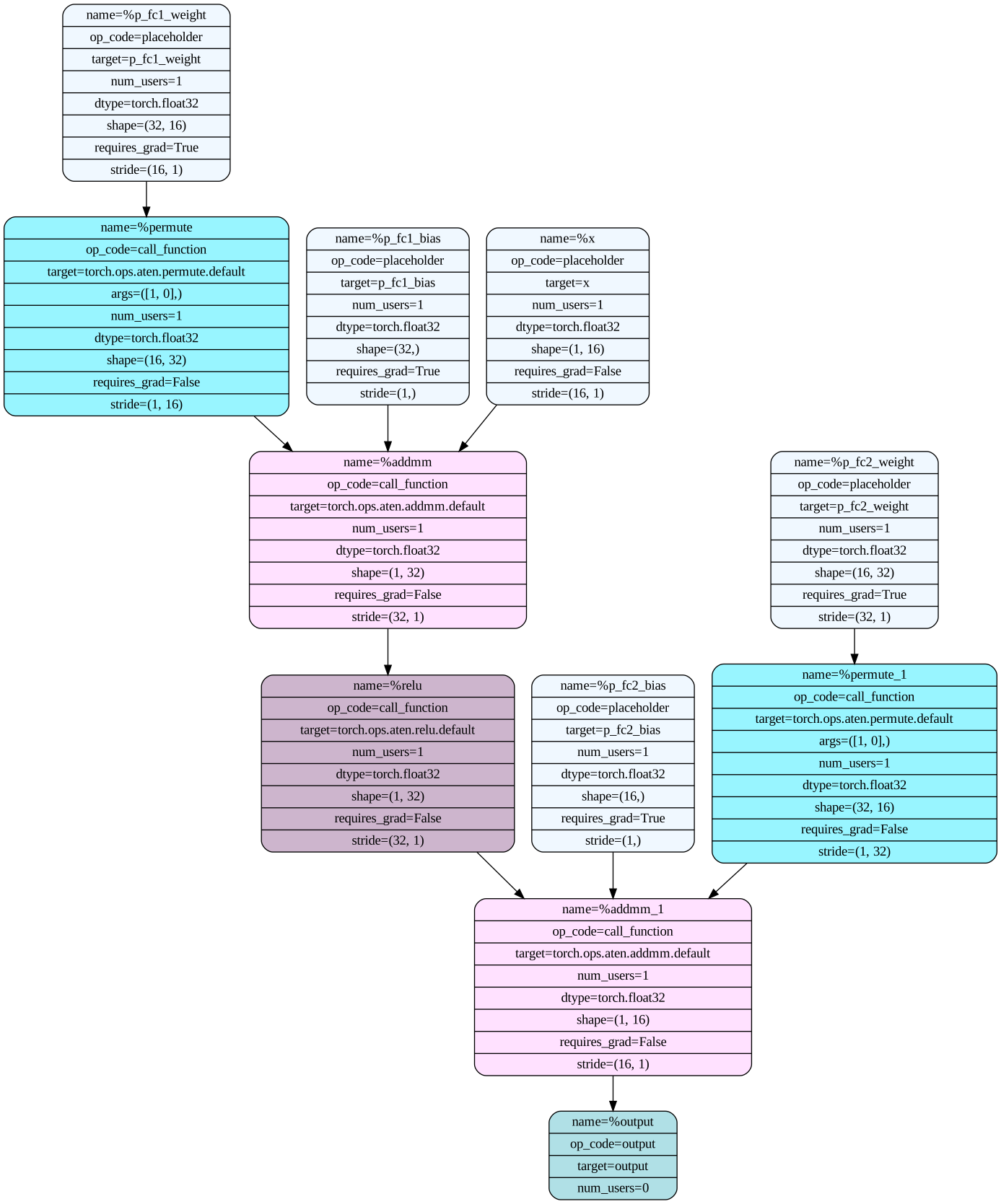
Core ATen ops is the core subset of ATen operators that can be used to compose other operators. Core ATen IR is fully functional, i.e., there are no side-effects, and there is no inplace or _out variants in this opset. The previously exported ATen graph can be further lowered to Core ATen IR using run_decompositions, which decomposes higher-level ATen operators into Core ATen operators. In this case, aten.linear operator is decomposed into aten.permute and aten.addmm operators, while aten.relu operator remains the same.
The torch.export also supports exporting modules with dynamic control flow using torch.cond and torch.loop. The branches of the control flow, however, will be saved as subgraphs in the exported graph module. The following program demonstrates a simple MLP module with dynamic control flow using torch.cond.
defforward(self, x): x = self.relu(self.fc1(x)) # Dynamic control flow based on input using torch.cond # torch.cond captures both branches in torch.export deftrue_fn(x): return self.fc2(x)
deffalse_fn(x): return self.fc3(x)
condition = x.sum() > 0 x = torch.cond(condition, true_fn, false_fn, (x, )) return x
After exporting the above module using torch.export, we can see that the true and false branches of the torch.cond are saved as subgraphs true_graph_0 and false_graph_0 in the exported graph module GraphModule, whereas previously the GraphModule do not have any subgraphs.
Saving the exported program to graph for visualization using FxGraphDrawer will not include the subgraphs. The subgraphs have to be saved separately by calling FxGraphDrawer on each subgraph.
It might be very desirable to have a visualization tool that can visualize a PyTorch export model, just like what Netron does for ONNX models, especially for complex PyTorch models with dynamic control flows.